
Database building for structured business records
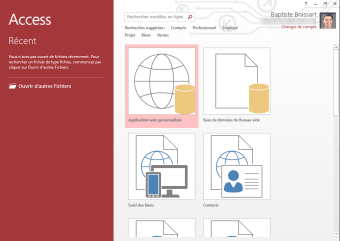
Microsoft Access is a database builder for teams that outgrow spreadsheets but do not need a full server setup. It stores information in Relational tables and lets users retrieve it with Query design, so lists become searchable records that can be reused across projects. The logic stays visible, making reviews easier.
Top Recommended Alternative
Microsoft Access also supports fast data capture through a Form builder and consistent outputs via Report templates. It works well for inventory, contacts, and internal tracking where accuracy matters, though it still rewards careful planning when multiple people touch the same file. Sharing works best when structure stays consistent.
Turning records into a maintainable database
Microsoft Access shines when a team needs structured records with rules, not just freeform cells. Using the Relationships window, it can connect records so one change updates everywhere, and Primary key enforcement helps prevent duplicates. Validation rules keep entries within expected ranges, which reduces cleanup later. That structure is a big plus for audits and repeatable reporting, but it also means the database must be designed up front, or edits get messy as requirements shift. It works best for departmental apps where ownership is clear and data definitions stay stable.
Day to day, it feels like building a small app: data-entry screens, filtered views, and saved outputs. Import and export handles CSV and workbook feeds, while Linked data sources let the same front end point at shared records. Macro actions help automate repetitive steps without deep coding. Performance stays solid for moderate datasets, but very large files or many edits at the same time can strain a single database file. Design choices also affect speed. Airtable and FileMaker are quicker for collaboration, while SQLite is leaner for embedded use.
For teams that need extra logic, VBA scripting can extend behavior, but it raises maintenance costs when staff change. A safer pattern is Split database design, keeping shared data separate from each user’s copy to reduce conflicts. Regular use of Compact and Repair helps control file growth after heavy edits. The upside is strong local control and predictable behavior; the downside is limited scale compared with MySQL or PostgreSQL when many users need access at once. Clear ownership and backups keep it dependable for long-running departmental systems.
A smart step beyond spreadsheets
Microsoft Access is a practical choice for small teams that need structured records and repeatable results without standing up a full database server. It handles moderate datasets well, keeps business rules easy to review, and supports clean handoffs when workbooks have become too fragile. Setup still matters, and it won’t match the scale of MySQL or PostgreSQL, but for internal tracking and departmental apps, it remains a dependable fit.